

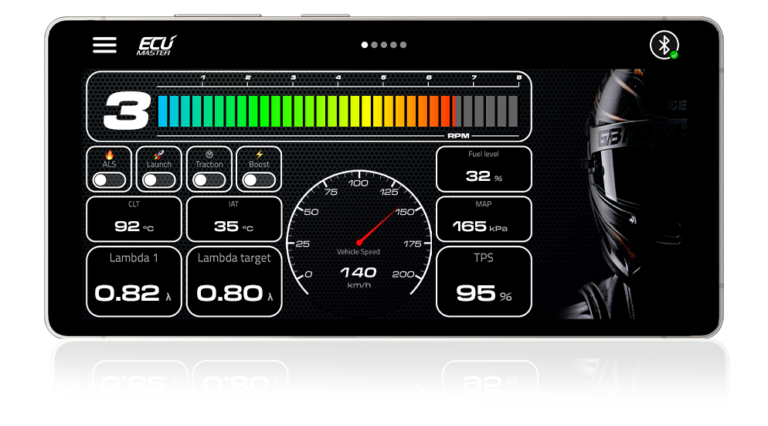
eDash – your phone is your dashboard
Turn your smartphone or tablet into a fully configurable digital dashboard. eDash shows live engine data from your ECUMASTER ECU over Bluetooth.

Available for iOS 16.1+ and Android 11+.
Download the eDash user manual (PDF)
About eDash
eDash is the official ECUMASTER dashboard app for motorsport, tuning and performance cars. It connects wirelessly to your ECU and displays real-time data on any smartphone or tablet.
Build your own layouts, set alarms for critical values and control selected ECU functions with on-screen buttons. Save several layouts and share them with other users.
Designed for motorsport, tuning, and performance applications, eDash provides a clear and customizable interface that helps you keep full control over your engine data.
The app works on both iOS and Android devices and allows you to create dashboards tailored to your vehicle setup.
Key Features:
- Real-time ECU data – live engine parameters over Bluetooth
- Custom layouts – add and arrange gauges, bars and text values
- Alarms – a pop-up alarm bar appears on screen when your alarm condition is met
- Metric or imperial units – choose °C or °F, km/h or mph, bar/kPa or psi for the whole app
- On-screen buttons – control selected ECU functions (two-way communication)
- Custom backgrounds – use your own images
- Landscape and portrait – a separate layout for each orientation
- Multiple layouts – save layouts as files on your device and load them with Import
- Layout sharing – send your layout to other users
Compatibility
Officially supported:
- 🍏 iOS 16.1 or later
- 🤖 Android 11 or later
Not officially supported:
eDash can also be installed on Android 9 and 10 and on Android-based head units with customized operating systems. The app works correctly on many of these devices, but on some it may be slower or less stable, and certain features may not work correctly.
Supported ECUs and Bluetooth devices
| ECU | Bluetooth device | On-screen buttons |
| EMU PRO | BT CAN | No |
| EMU Black V3 | EDL-1 / BT CAN | EDL-1: yes / BT CAN: no |
| EMU Black V2 | EDL-1 / BT CAN | EDL-1: yes, no rotary buttons / BT CAN: no |
| EMU Classic V3 | EDL-1 / BT module / BT CAN + CAN module | EDL-1: yes / others: no |
| EMU Classic V1 | EDL-1 / BT module / BT CAN + CAN module | EDL-1: yes, no rotary buttons / others: no |
Important: Your ECU and Bluetooth device need up-to-date firmware.
Check the required versions in the eDash user manual (PDF).
Support for buttons on more devices is in development.
Products: EDL-1 · BT CAN / Bluetooth module
Get started
- Update your ECU and Bluetooth device firmware to the versions listed in the eDash user manual.
- Connect a supported Bluetooth device (EDL-1, BT CAN or Bluetooth module) to the ECU and power it on.
- Connect the ECU to your computer, open the ECU’s PC software and set it up for your Bluetooth device. You will find the required settings in the user manual of your Bluetooth device.
- Install eDash from the App Store or Google Play.
- Turn on Bluetooth on your phone, open eDash and tap the Bluetooth icon.
- Select your device: EMULOGGER (EDL-1), EMUCANBT_SPP (BT CAN) or EMUBT (Bluetooth module). On Android, if the device is not visible in BLE mode, switch to SPP mode (PIN: 1234).
- Open Edit Layout and build your dashboard.
Full instructions are in the eDash user manual (PDF).
FAQ
Is eDash free?
Yes. eDash is free to download and use.
Which ECUs work with eDash?
EMU PRO, EMU Black and EMU Classic with the firmware versions listed in the eDash user manual.
Do I need extra hardware?
Yes. Your ECU needs a Bluetooth device: EDL-1, BT CAN or the Bluetooth module, depending on the ECU.
Why don’t the on-screen buttons work?
Buttons need two-way communication. Today this works with EMU Black and EMU Classic connected through EDL-1. Support for buttons on more devices is in development.
Where can I get help or share ideas?
Join the eDash section on ECUMASTER Community or contact our support.